
Multiplayer is one of the most dreaded topics in game development. It adds so much extra work to developement and testing that you are usually looking at 5-10x the overall production effort (depending on the type of game you are making, ofc). And it gets underestimated all the time because no one wants to accept this harsh reality.
The best documentation for multiplayer in Unreal is probably Cedric Neukirchen’s Multiplayer Network Compendium. It’s more detailed than Epic’s own documentation about Replicate Actor Properties and has some nice graphics.
In this post, I want to highlight some common replication issues Unreal developers (even experienced ones) keep getting fooled by:
1. Value “skipping” on client
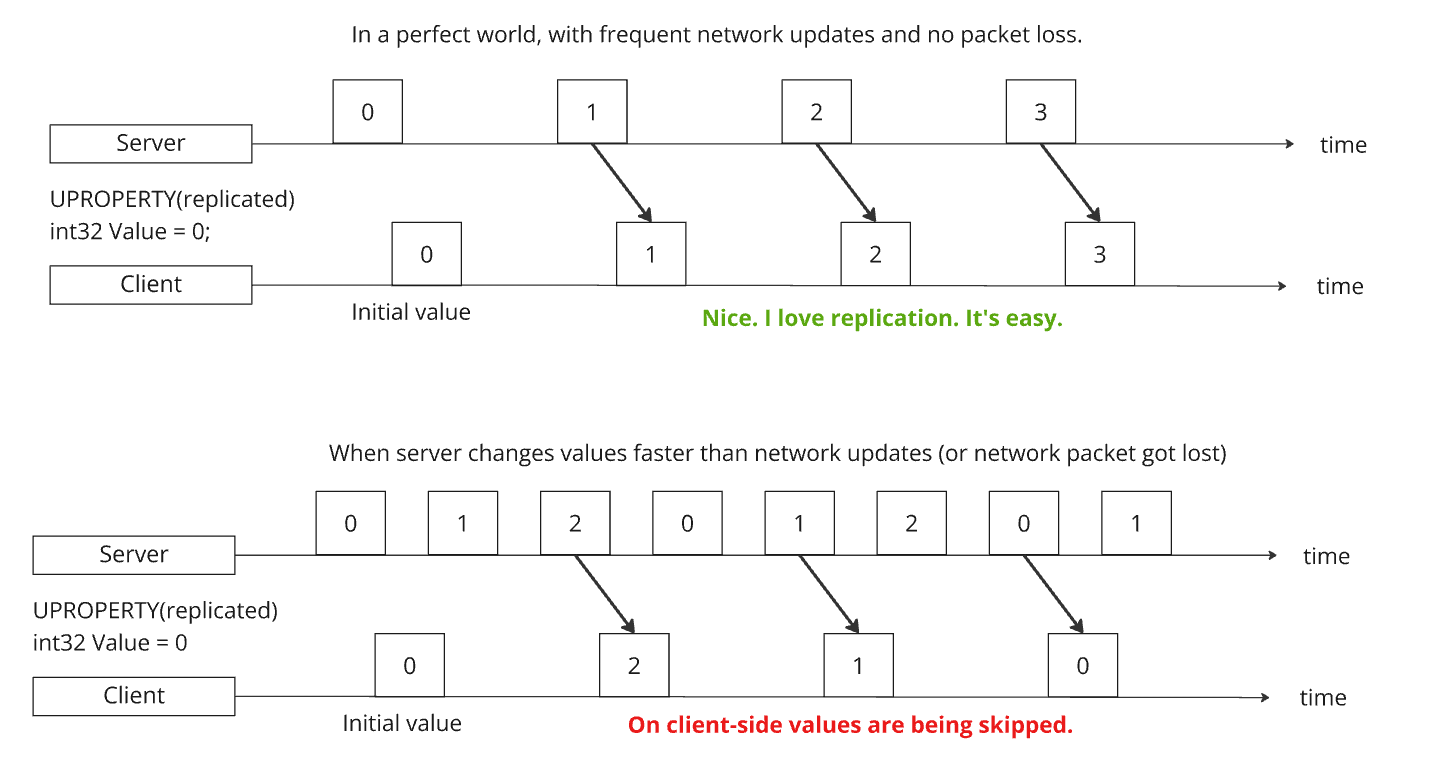
Replication is meant to sync the client to the most recent state of the server. It does not ensure the client receives the entire history of changes from the server. This can become problematic, if you use the replicated property (potentially an enum) to drive a state machine.
If the property changes multiple times on the server (in between network updates), the client will never know that there had been some in-between transitions and the values appear to get “skipped”.
It can go so far that, if the server changes the value and back to the same value the client last knew and sends that with the next network update, from the client perspective nothing changed at all and you will not even get the RepNotify callback (unless you explicitly use REPNOTIFY_Always as notify condition, but the default setting for that is REPNOTIFY_OnChanged).
2. RepNotify callback BEFORE BeginPlay
This is a classic "late join issue", which makes multiplayer bugs so hard to track down. Calls can arrive in different order and you need to handle different timings. Any RepNotify function could be called before BeginPlay.
If you need to access the GameState or have other dependencies that aren’t ready before, you need to cover this case by doing a manual call during BeginPlay, like so:
1
2
3
4
5
6
7
8
9
10
11
12
13
void AMyActor::BeginPlay()
{
    Super::BeginPlay();
    ApplyMyValue();
}

void AMyActor::OnRep_MyValue()
{
    if (!HasActorBegunPlay())
        return;

     ApplyMyValue();
}
3. Inherited Replicated Properties
Some things on a Actor are replicated by default and you should be aware of them:
- Component Activation:
bIsActiveis a replicated property inActorComponent - Visibility:
bHiddenis replicated - flag set bySetActorHiddenInGame() - Attachment: When attach parent changes it will get replicated
More often than not this is the behavior you want anyway, but there are cases where you want explicit control of these properties on the client and the replication is working against you.
Here are two examples of where I had to explicitly disable replication of bIsActive because it interfered:
- A state machine with a replicated
stateproperty used to drive component activation, led tobIsActiveand thestatefighting over who turns components on/off. Basically whoever got “replicated first” would get overriden by the other. A complete mess. - Deactivating a
SkeletalMeshComponentafter its animation finished playing. On the server the timing was perfect, but on the client, due tobIsActivereplication, it could happen that the component stopped ticking in the middle of the animation.
Luckily, there is a way to explicitly disable replication of inherited properties:
1
2
3
4
void AMyComponent::GetLifetimeReplicatedProps(TArray<FLifetimeProperty>& OutLifetimeProps) const
{
	DISABLE_REPLICATED_PRIVATE_PROPERTY(AMyComponent, bIsActive)
}
4. Setting replicated properties on the client
I’ve heard the general advice to never ever do this! With the main argument being that it messes up change detection for OnRep nofify callbacks. Which is true. However, I disagree with the “never do this” advice.
There are cases where you want explicit control and all you need are the correct replication conditions!
For example, if the owning client should manage their local value independently, while other clients (aka “simulated proxies”) still receive the replicated value from the server, one can use COND_SimulatedOnly as replication condition on the property like so:
1
2
3
4
void AMyActor::GetLifetimeReplicatedProps(TArray<FLifetimeProperty>& OutLifetimeProps) const
{
	DOREPLIFETIME_CONDITION(AMyActor, MyReplicatedProperty, COND_SimulatedOnly);
}